

Authentication
How to create, scope, and rotate API keys, and how sandbox vs. live mode is decided.
What this is and who needs it
Every request to EPD must prove which merchant it belongs to. You do that by sending an API key in the Authorization header. The key also tells EPD whether the call should run in sandbox mode (no real money) or live mode (real money moves).
If you are building any integration (server, script, batch job, MCP client), you need to read this page once.
The header
Authorization: Bearer epd_test_sk_xxxxxxxxxxxxxxxxxxxxxxxxxxxxxxxx
Send it with every single API call. There is no session, no cookie, no login flow.
The keys on this page are secret keys: they carry full REST API access and must stay server-side. Never put a secret key in mobile app source, in a SPA bundle, in a public repo, or in client-side analytics. If one leaks, rotate it immediately from the Merchant Portal.
The one key type that is safe in the browser is a publishable key (epd_live_pk_… / epd_test_pk_…): it is capture-only and can do nothing but tokenize a card. See EPD Elements.
Key types
| Prefix | Mode | Scope | Use for |
|---|---|---|---|
epd_test_sk_... | Sandbox | Full access (all permissions) | Local development, integration tests, CI |
epd_live_sk_... | Live | Full access (all permissions) | Production servers |
epd_restricted_sk_test_... | Sandbox | Per-resource permissions you choose | Sandbox keys for narrow-purpose services |
epd_restricted_sk_live_... | Live | Per-resource permissions you choose | Production keys scoped to one job (e.g. read-only) |
epd_test_pk_... | Sandbox | Capture-only (browser) | Browser card capture with EPD Elements |
epd_live_pk_... | Live | Capture-only (browser) | Browser card capture with EPD Elements |
The prefix is the only thing that decides sandbox vs. live. There is no separate base URL.
The sk rows are secret keys, the subject of the rest of this page. The pk rows are publishable keys: browser-safe, capture-only, and covered in full by the EPD Elements guide.
Sandbox vs. live: which company you’re in
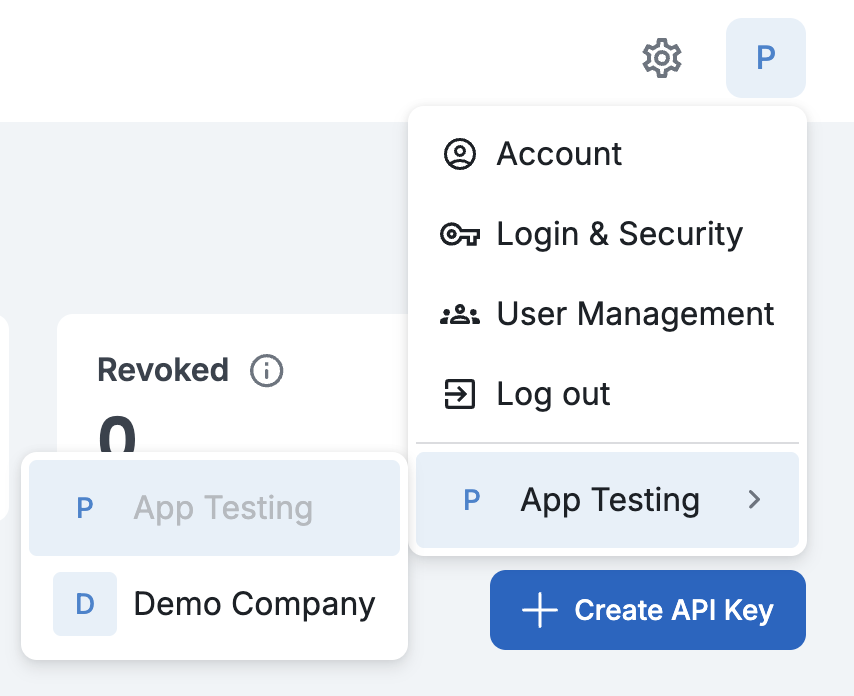
When you signed up, EPD provisioned two workspaces side by side: your real company and a Demo Company. The Demo Company is the sandbox; there is no environment selector when you create a key. A key inherits its mode from whichever company you were in when you clicked Create:
- Keys created inside your real company → live keys (
epd_live_sk_...) - Keys created inside the Demo Company → sandbox keys (
epd_test_sk_...)
Switch companies from the profile avatar (top right of the portal) before creating a key.
Where keys live in the Merchant Portal
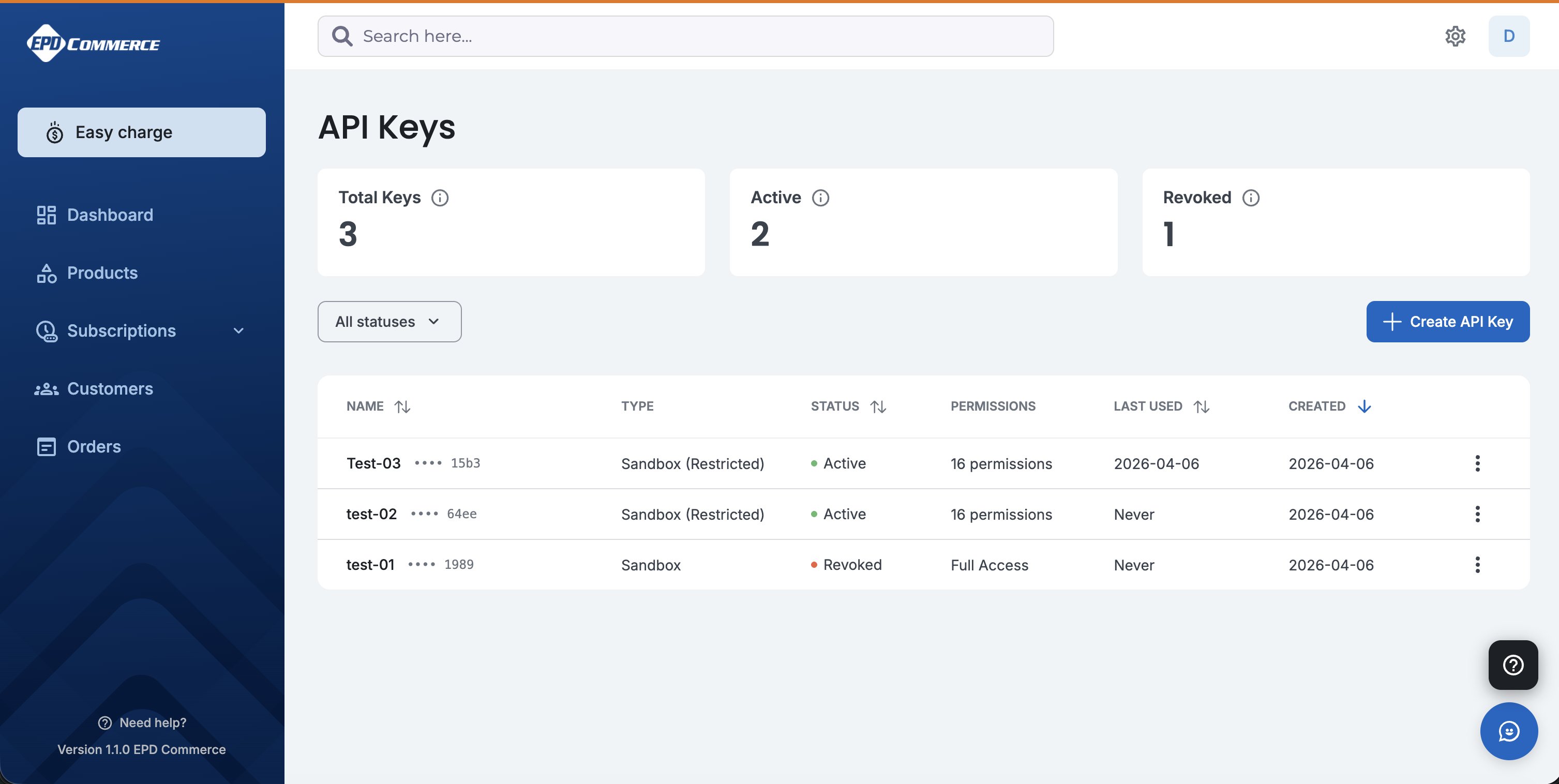
In the Merchant Portal, open the gear icon (top right), choose Developer & Integrations, and stay on the API Keys tab. The page lists every key in the company you’re currently viewing, with its mode (Sandbox / Live), permissions scope, when it was last used, and whether it has been revoked.
Creating a key
The + Create API Key button (top right of the list) opens this dialog:
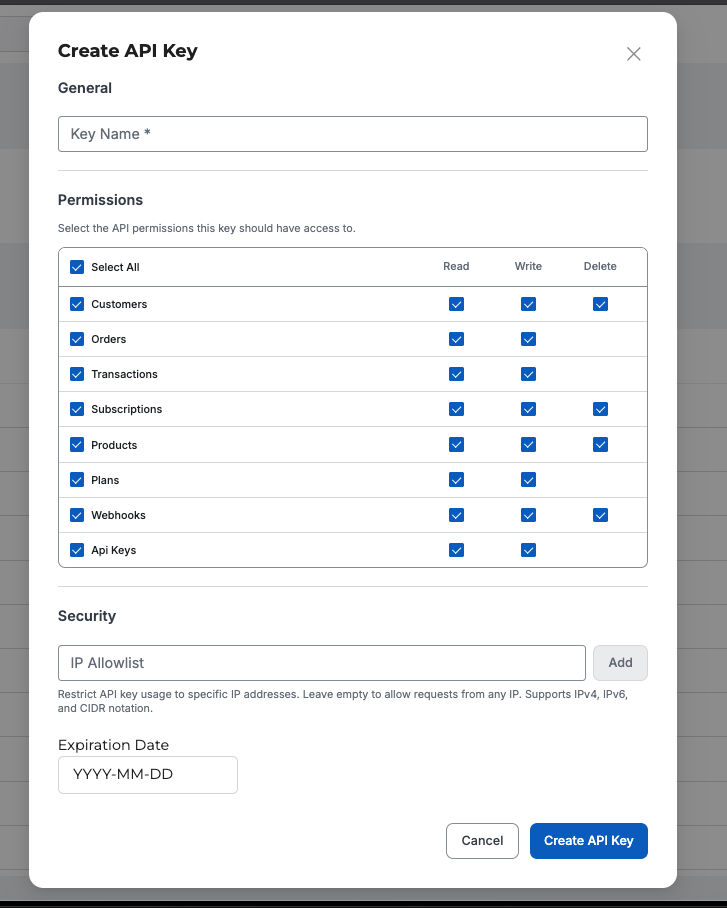
Use restricted keys whenever possible. A read-only reporting service should not hold a key that could refund orders.
Sandbox vs. live mode
There is one base URL: https://api.epd.com/v1. Whether a request runs in live or sandbox mode is determined entirely by the key.
Sandbox keys hit the same API, the same endpoints, the same JSON shapes. The difference is that no real money moves and you use test card tokens to simulate outcomes.
Live keys process real payments against real cards. Switch to live keys only after you have completed integration testing in sandbox.
If you accidentally send sandbox-only data (such as a sandbox card_token) with a live key, or vice versa, the API returns environment_mismatch (HTTP 403).
Recommended setup
Never commit keys to git. Use AWS Secrets Manager, GCP Secret Manager, HashiCorp Vault, Doppler, or your platform’s equivalent.
One key per environment: dev, staging, prod. Do not share. If one leaks, you only rotate one.
A worker that only needs to read transactions should hold a restricted key with transactions: read and nothing else.
Rotate secret keys at least every 90 days, and immediately on any suspected compromise. EPD lets you keep both old and new keys active during the rollover.
Errors related to authentication
| Code | Status | Meaning |
|---|---|---|
missing_api_key | 401 | No Authorization header was sent. |
invalid_api_key | 401 | The key does not exist or is malformed. |
invalid_api_key_format | 401 | The key has the wrong prefix or length. |
expired_api_key | 401 | The key passed its expiration date. |
revoked_api_key | 401 | The key was revoked from the Merchant Portal. |
ip_not_allowed | 403 | Request came from an IP not on the allowlist for this key. |
insufficient_permissions | 403 | Restricted key lacks the permission required by this endpoint. |
environment_mismatch | 403 | Live key used with sandbox-only data, or vice versa. |